The Keyword Assistant is an SEO tool that allows you to research keywords in ChatGPT. To use it, you must be logged into our SEO Academy.
Provide the Keyword Assistant with individual terms that are important to you, and it will research additional, similar keywords from an SEO database for you. This includes monthly search volume, click prices, and search volume. Alternatively, you can also provide individual web addresses (URLs) as the basis for the research, for example, from articles that you know rank well.
You can download the researched keywords here. Use them to develop your SEO strategy or to write or optimize individual content. In this workshop, you will find instructions on how to work with the Keyword Assistant.

Prompt Templates You Can Work With
Here you will find prompt templates for specific SEO and content applications. The example is a WordPress agency from Hamburg. You can replace the initial keywords and URLs according to your requirements.
Keyword Research
Please perform a keyword research for “create website” and present the result in a table.
Group Keywords by Topic
Please group the researched terms into topics and present them in a table. As additional columns, I would like to have the keywords for each topic and the aggregated search volume of the topic’s keywords.
Retrieve Keywords for URL
Please retrieve the keywords for this article via the API and present them in a table: https://www.ionos.de/digitalguide/hosting/blogs/eine-wordpress-seite-erstellen-anleitung-fuer-beginner/
Frequently Asked Questions
This can occur 🙂 It is important to know that you have not broken anything and cannot break anything.
First, you should ask the Keyword Assistant to repeat the request. Sometimes, this resolves the issue.
If that doesn’t help, the Keyword Assistant often provides hints about what went wrong.
If, for example, there is a hint that too many queries have been made, you can try again in a few minutes or later in the day.
In any case, you can email Fabian, preferably with a screenshot. He will look into it.
You can make 20 requests to the SEO database per day.
To use the Keyword Assistant, you must be logged into the Academy on our website. After you click the green button in the GPT “Log in with api.jaeckert-odaniel.com”, you will be briefly redirected to the website and then back. After that, you should be logged into the GPT.
If an error occurs there, e.g., “Couldn’t log in with plugin”, you can try the following:
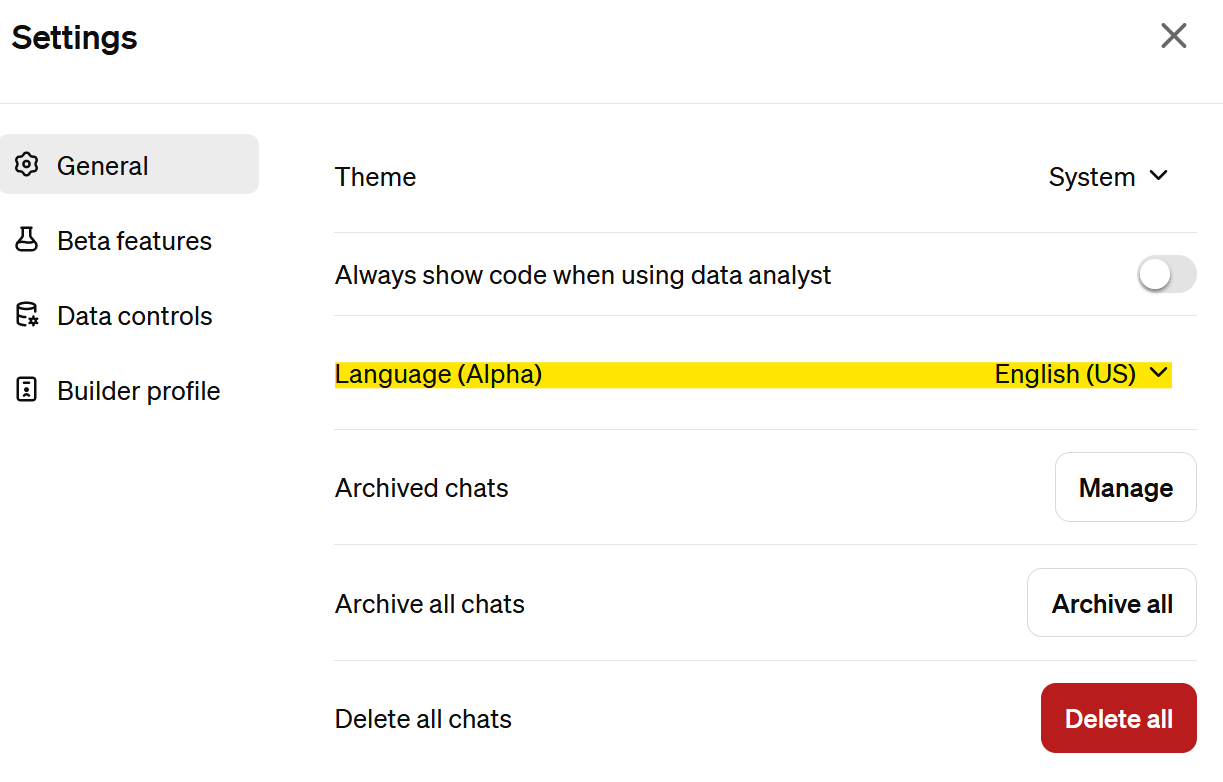
In your GPT settings, set the Language (Alpha) section to “English (US)”, see screenshot below.
Then test the login in the Keyword Assistant again.