

SEO headings structure a text – for search engines as well as for users. They organize website text from the top-level heading (so-called h1) down to subheadings (h2 and h3).
The formulation of the h1 heading is very important in search engine optimization because it sends clear signals about the page’s content.
But above all, it is a great help for users. This refers to usability or user-friendliness through better readability. Because the heading is the first thing one sees on the website.
At the same time, content managers only have a few words of space. It requires craftsmanship in writing – and ideally, concrete templates.
In the podcast episode and on this page, we explain what to pay attention to for SEO regarding headings and heading structure. We discuss this using examples.


You are currently viewing a placeholder content from Default. To access the actual content, click the button below. Please note that doing so will share data with third-party providers.
More InformationHere is a short excerpt from our podcast episode.
H1, H2 etc.: What is the Hierarchy in SEO Headings?
In website texts, headings are specified in sizes from h1 to h6. They are comparable to heading styles in Word. The respective size can be selected, for example, in editors within content management systems like WordPress or Typo3 (see image). Regarding formatting, this selection usually influences the size of the letters.
The following applies to the hierarchy:
The largest heading (h1, main heading) should be at the top. Subheadings follow, which usually receive an h2 heading. Individual aspects below them receive an h3 heading.
Further headings like h4, h5, and h6 should only be used very sparingly. It is also always about ensuring that content – meaning a text or an individual subpage – is clear and easy to understand through its heading structure.
Technically speaking, a heading is an HTML tag that marks individual text areas as headings via the source code:
- <h1>First-order heading</h1>
- <h2>Second-order heading</h2>
- <h3>Third-order heading</h3>
- …
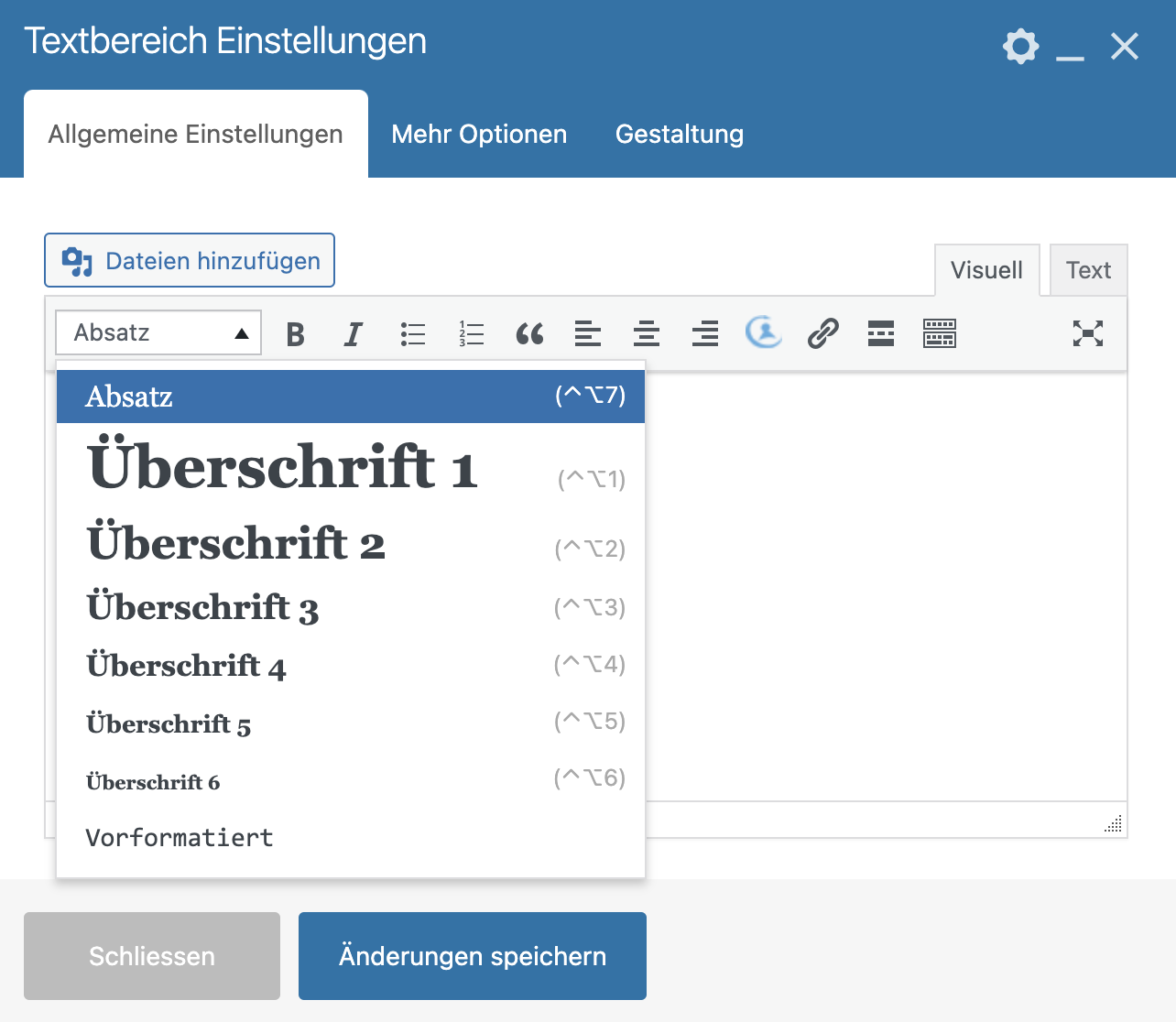
This heading function is displayed, for example, in a WordPress editor. You mark the text and set the heading.
What Does the H1 Heading Mean in SEO?
The h1 heading is the headline of the respective URL. It clearly indicates to Google what the main topic is. Therefore, the most important keyword should definitely be mentioned in the h1 heading.
Generally, there should only ever be one h1 heading per URL, i.e., subpage. If multiple h1 headings are created in the content management system, this can lead to confusion – both for Google and for users.
Often, the h1 is equated with or confused with the “title tag,” presumably because the content of the title tag and the h1 heading is often identical. However, unlike headings, the title tag is specified in the head section of the source code. It often forms the Google Snippet – i.e., the preview in the search results.
When writing h1 headings, however, attention should not only be paid to mentioning the keyword, but also to promising a clear benefit.
This depends on the respective page type. A product detail page often receives a more commercial heading, while for a guide text, the editorial added value should be mentioned in the heading (e.g., tips, experiences, etc.).
What Do H2 Headings Mean in SEO?
A URL (landing page, product page, guide text) often consists of several sections. This is where h2 headings come into play – for SEO and for users.
The h2 headings structure the respective subpage – and are simultaneously very important for SEO. Longtail keywords are often mentioned here. This clearly signals to Google that longtail search terms also play a role on the page.
Thus, there are usually several h2 headings per URL. Nevertheless, h2 headings should not be used excessively. They make sense when it is a clear content section.
We also recommend visually separating the respective sections. However, this is often easier on landing pages than, for example, with guide/blog articles.
Example of an SEO H1 Heading


The H1 heading discussed in the example is very factual and sober. It answers the most important question: “What is it?”
Many companies rely on informative content “around the product.” With such an SEO strategy, users are specifically engaged at the beginning of their customer journey.
This is reflected in the corresponding content formats on the website. In this example, a company has opted for a glossary. Here, central terms are explained in detail.
In the Google Snippet, this approach is deepened by a series of further relevant terms that interest users.
This example also shows the difference between an h1 heading and the meta tag “title.” These two things are often confused: The h1 heading is the main heading above the text, visible on the website (here: “What is the EEG Surcharge”). The meta tag “title” is a specification in the website head that is not visible on the website but is often used by Google as the heading for the search result snippet (here: “What is the EEG Surcharge: Background, Development, and Criticism”).
Tip: With the Head of Marketing, we discussed this SEO strategy here. More about what constitutes a Google Snippet here.
Examine Website:
which Heading is in the Source Code?
One often faces the question of whether the headings are correctly integrated on an existing website. Or one is unsure during text creation whether the heading has been set correctly. You can easily check it – directly in the source code.
Regardless of whether you use Firefox, Safari, or Chrome as your browser:
- Hover your mouse over the heading you want to check
- Right-click so that the menu opens
- Click on “Inspect” (Safari: “Element Information”)
Then a window with your page’s source code opens (usually at the bottom, sometimes on the right). The practical thing is: You are directly at the point where the element you clicked on is selected – in this case, the heading. Look for the <h1>, <h2>, <h3>, that you want to check. If you hover your mouse over it, the heading lights up in the browser. Now you can check if the heading in the HTML has the correct number.
Source code sounds complicated at first, but the advantage is that you check it directly “at the source,” without going through editors and the CMS system. If it is correctly specified in the source code, it is also truly correct for Google and co.
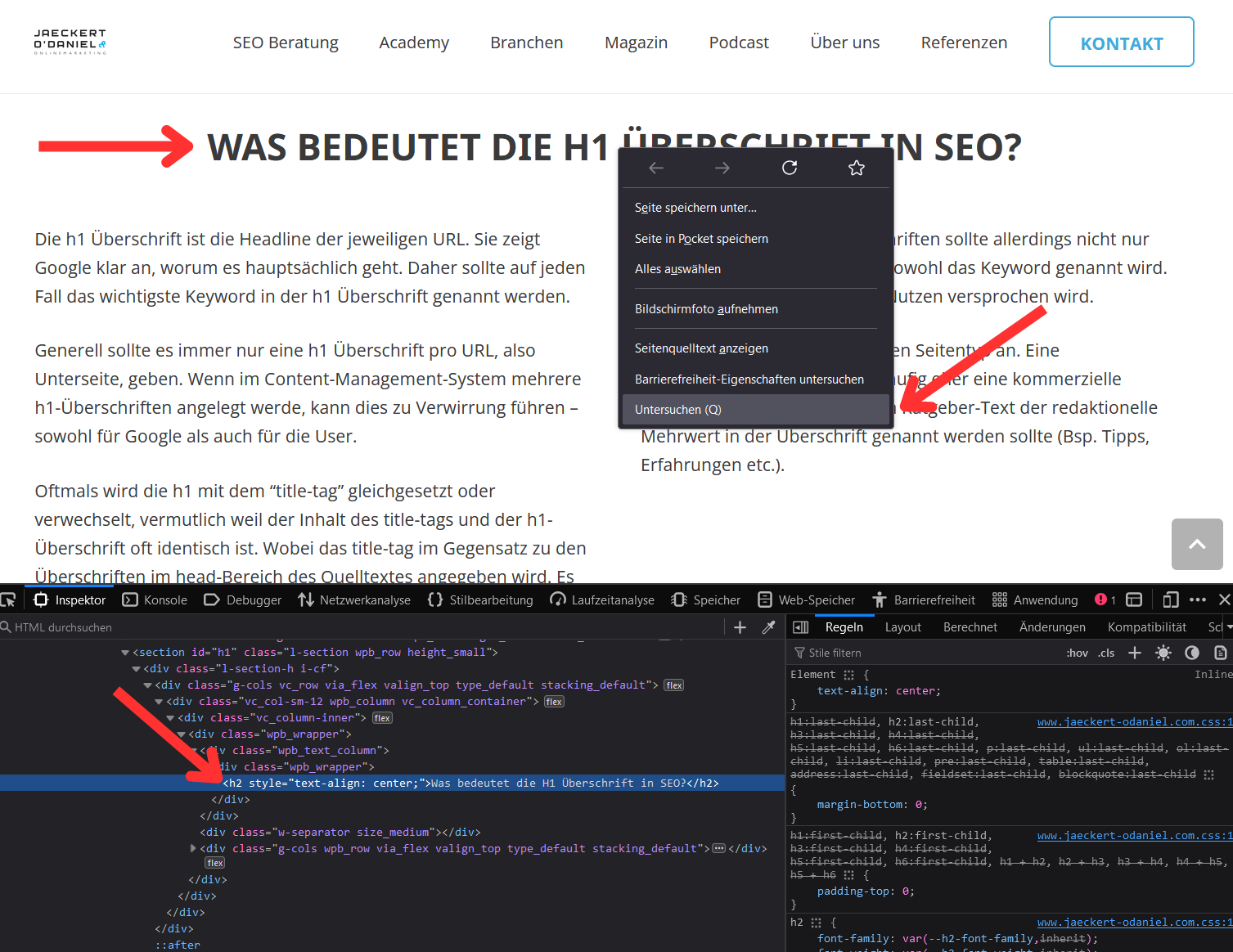
How to check the HTML source code of the heading in the “Developer Console”
Another Example of an SEO Heading: a Spin in the Product Description

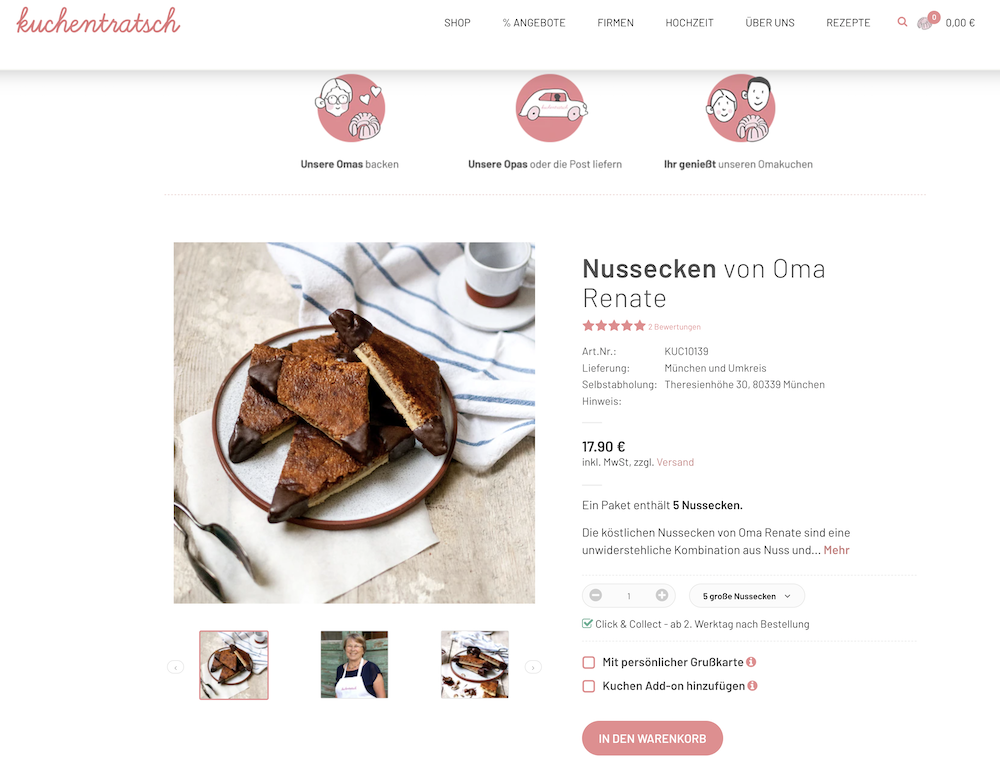
Many product detail pages have significant weaknesses in their content: Either they are formulated very salesy, or they are heavily overloaded with promotional slogans. Exaggerated example: “Buy now” followed by numerous emojis.
This website takes a different, in our view, very elegant approach. The product is linked to a person who is reflected in the H1 heading.
In the Google Snippet (meta tag “title”), the H1 heading was further enriched with a central benefit (“simply delicious”). This also differentiates the website in the search results from many other websites that also publish recipes.
SEO Strategies and Tips via our Newsletter

Example 3: a Clever Headline for a Guide Text

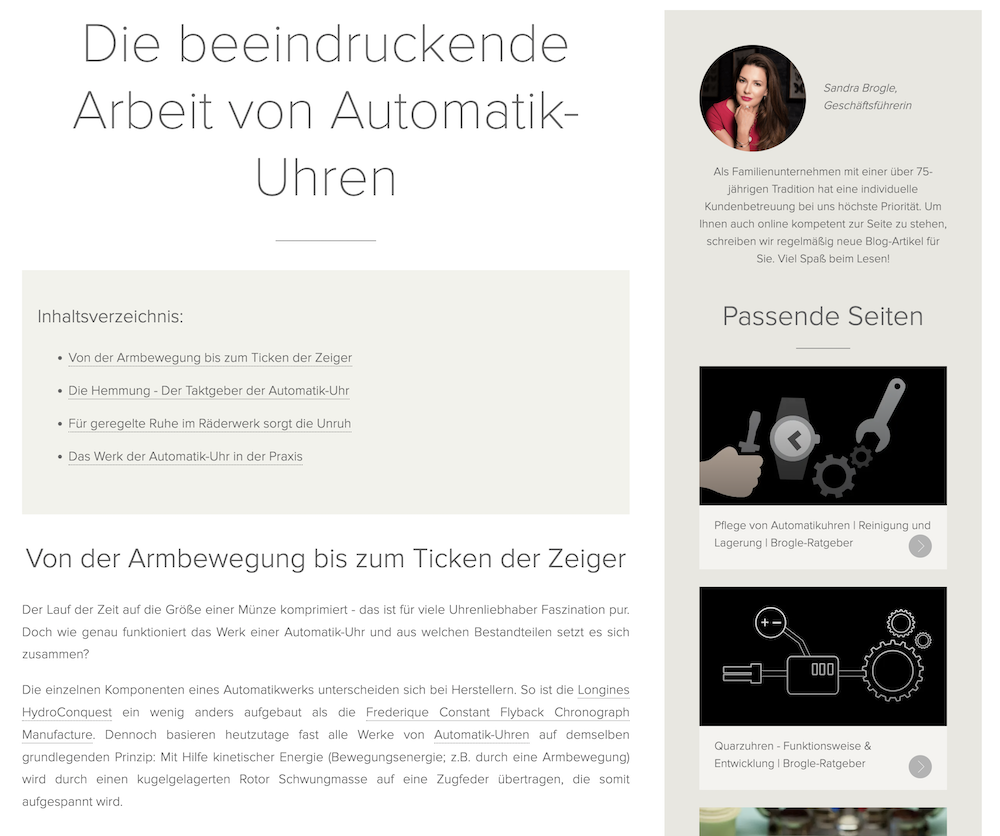
In the third example, a company relies on a guide section. Here too – similar to a glossary – users are addressed who are not yet looking for a specific product but are already in the information gathering phase.
The article ranks for the very valuable term “automatic watch,” which several thousand users search for monthly, as can be determined via a professional SEO tool.
Here you can see a difference in the Google Snippet and in the H1 heading on the website. On the website, the text was more promotional-editorial (“impressive work”). In the Google Snippet, the text is more functional and benefit-oriented (“how it works”).
Heading structure: The further text sections on the page are hierarchically introduced with a second-order subheading (h2).
Optimize Headings: many Companies Have these Three Problems
Learn more SEO – Completely Flexible and Affordable
Do you want to get better at SEO? Then take a look at our SEO Academy:
- Monthly fee, cancellable anytime
- Live Workshops Every Month
- SEO Roadmap Course for Strategy
- Personal SEO Coaching as an Additional Option
We discuss how successful SEO works using examples from our members.
If you have any questions about this, simply send us a message and provide your phone number. We will be happy to call you back.
The SEO Academy by Benjamin and Fabian is a true treasure trove for me. Even for someone with considerable SEO experience, I still encounter difficulties or simply lack the right idea for the next lever. In such moments, the precise templates, case studies, and resources of the Academy are a lifesaver for me. The in-depth content, combined with the expertise and approachable nature of Fabian and Benjamin, make the SEO Academy an indispensable tool in my arsenal. For anyone working in SEO, I can highly recommend this Academy. It is not only a learning platform but also a valuable source of inspiration, whether for beginners or professionals.

Technical SEO Tip: why Headings should not be Layout Elements
Many websites “misuse” headings in their layout.
Headings (“h1,” “h2,” “h3” markups in the HTML source code) often appear in menus or sidebars. They are used there, for example, to highlight text that introduces visual elements.
This results in two major problems:
- Hierarchy for Google: A website should ideally have an “h1” heading that states the central topic of the URL. Then come the individual sections, which are introduced via subheadings (h2). However, if one has already “used up” h1 and h2 multiple times in their layout, this no longer makes logical sense for the crawler. Google has problems determining the central topic of the page. Even semantic technologies like, for example, “passage ranking” become really difficult.
- Screenreaders: People with visual impairments often have the headings read aloud first to get a feel for the content and structure of a website. If the navigation is read aloud for 30 minutes first, that is super annoying.
Therefore, marketing managers should always also check the design, i.e., whether headings are used in the layout, and speak with web design or IT.
On an HTML technical level, there are no advantages to using headings in the layout. This can also be implemented differently.

The text is an excerpt from Fabian’s LinkedIn post on the topic. Interested in more such posts? Then feel free to follow on LinkedIn.
